P&M Measure Tracking
Preventive and Mitigative (P&M) Measures are now front and center. With the release of API 1170/1171 v2 and their incorporation into PHMSA regulations effective January 1, 2026, operators are expected to actively identify and act on measures that reduce well risk. P&M Measures represent real, actionable steps operators can take to lower risk and strengthen integrity programs.
RCP’s subject matter experts took the P&M Measures directly from the API guidelines, expanded on them, and tied each one to specific risk model questions. When this enhancement is added to your RCP risk model, TaskOp automatically flags recommended P&M Measures based on how you answer the assessment questions. Operators can immediately see how a well scores, compare it across their portfolio, and identify clear actions to reduce risk. For teams that want to go a step further, TaskOp can automatically generate work orders for field crews or push those actions into another system to keep work moving without delay.
How this tool works
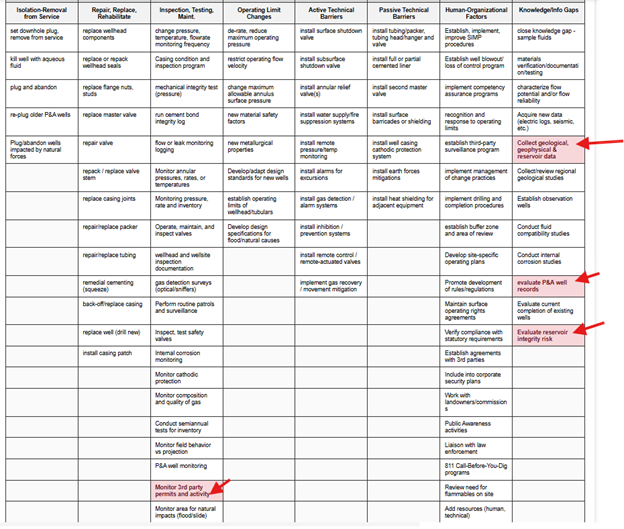
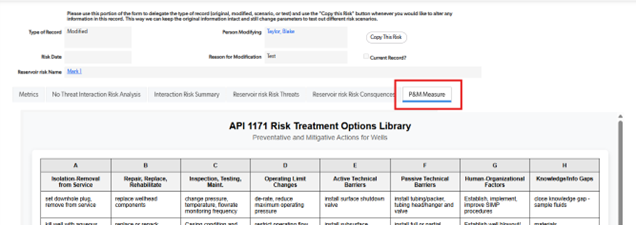
Each risk assessment includes a dedicated P&M Measure tab. Before the assessment is completed, no measures are highlighted. Once the questions are answered and the record is saved, applicable P&M Measures turn red, clearly signaling where action is needed to mitigate risk.
More enhancements are coming. Keep an eye on this blog for future updates, and if you are interested in adding this capability to your TaskOp application, let RCP know.
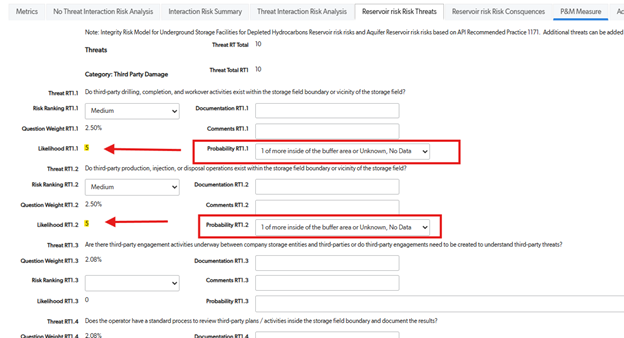
Change these threats from a 0 score to a score of 5 and save.
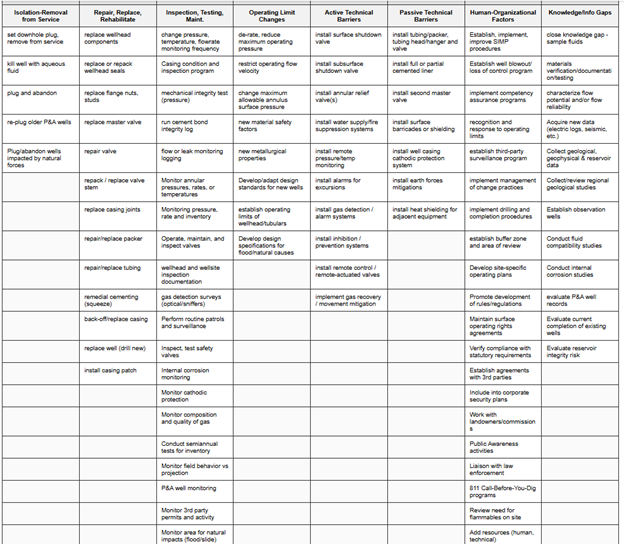
Before any Risk Questions are answered, the P&M Table remains uncolored.
Once you complete the questions and save the record, the relevant measures in the table will turn red, indicating that actions are required to mitigate the risk.